


워드프레스 개발팀에게 이 기능의 개선에 대한 지속적인 요청중입니다. ( SpStrap )
1. WPCode 플러그인을 설치 및 활성해주세요.
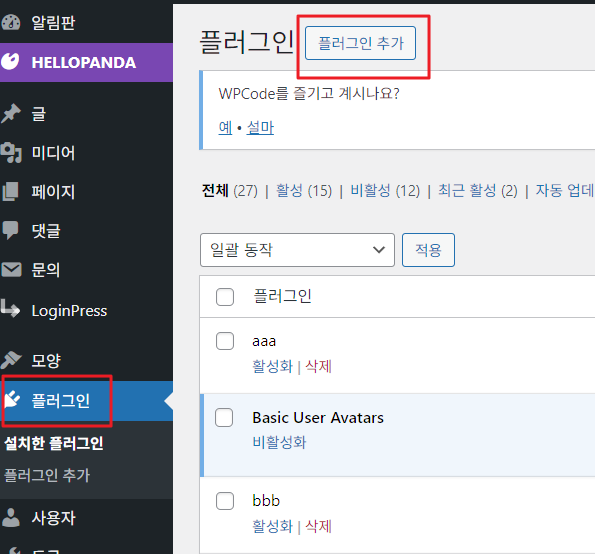
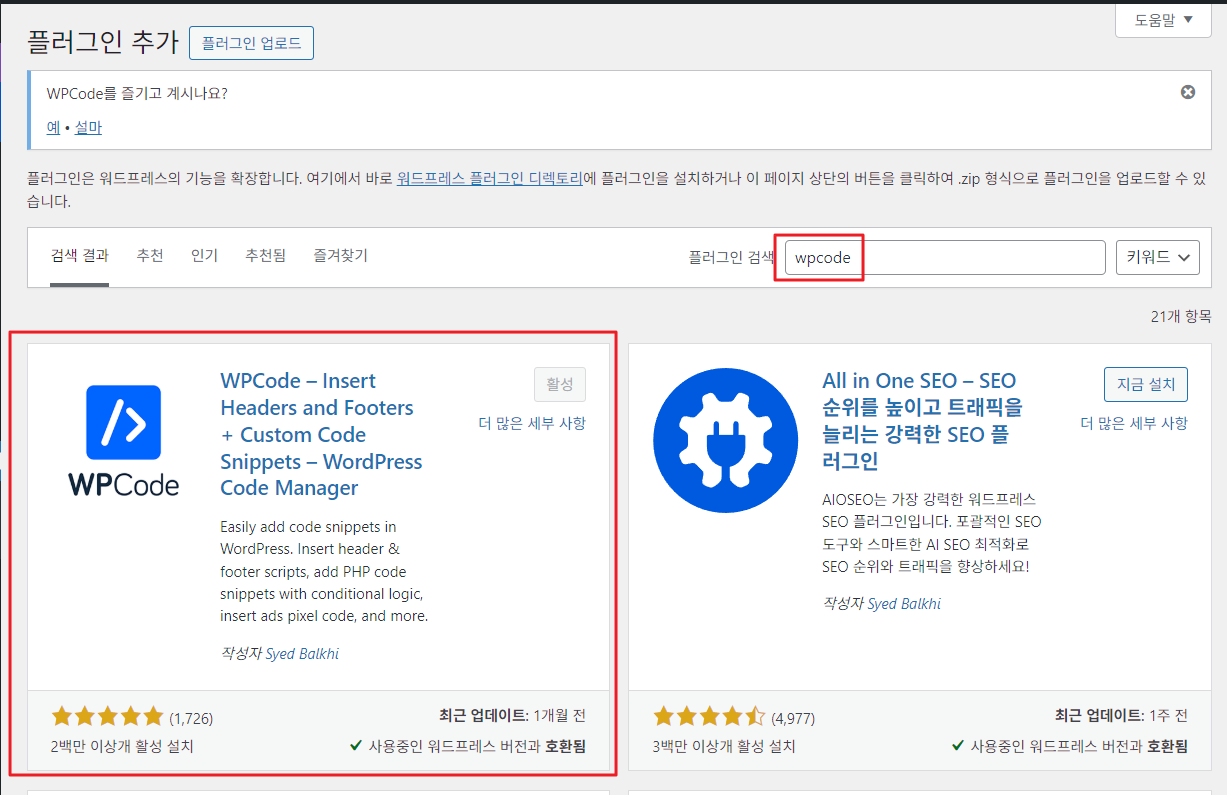
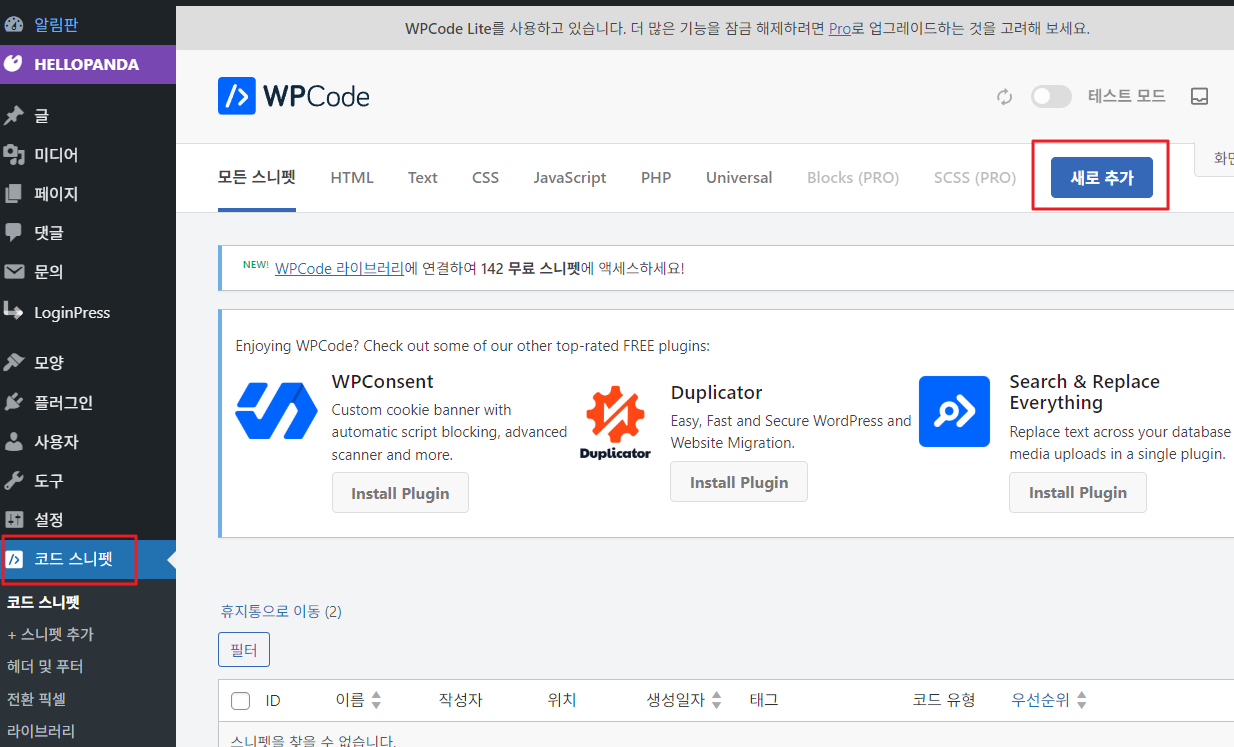
※ 스니펫을 2개(PHP, 자바스크립트) 추가해야합니다.
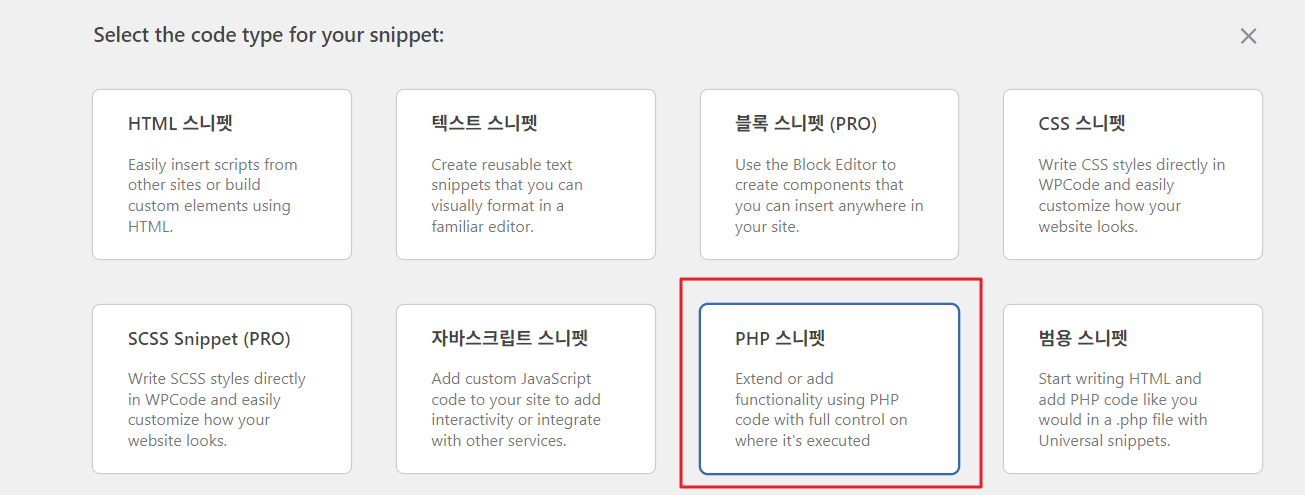
2. 코드 스니펫 메뉴에 접속하셔서 아래와 같이 PHP 스니펫을 추가해주세요.
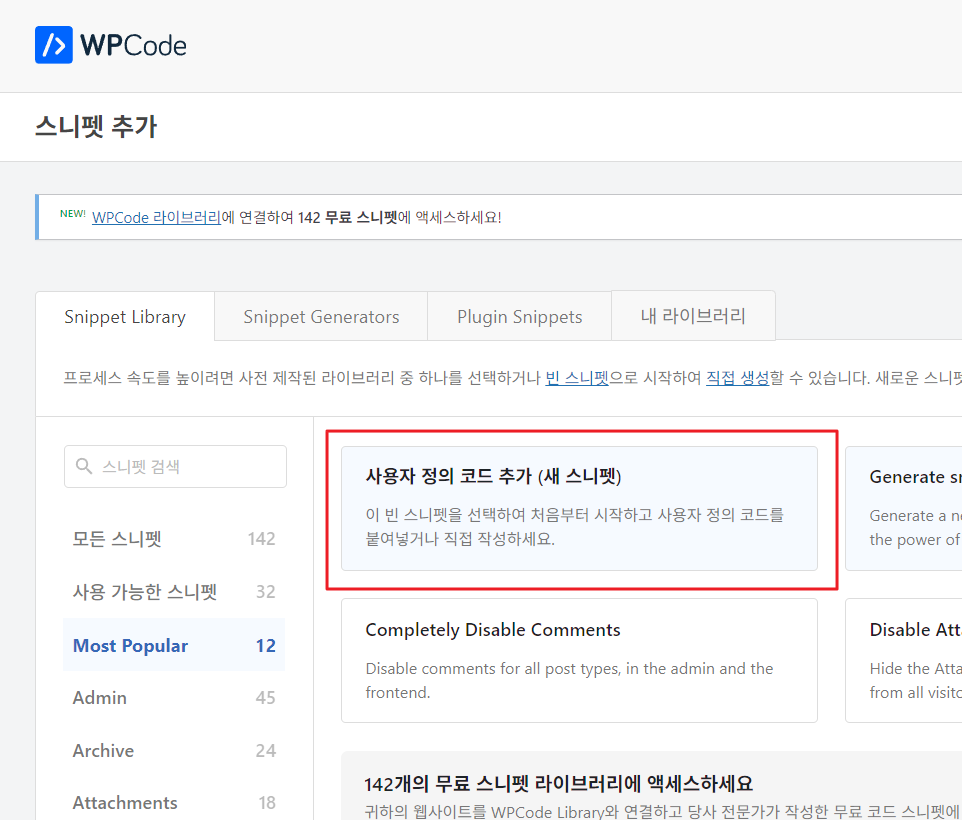
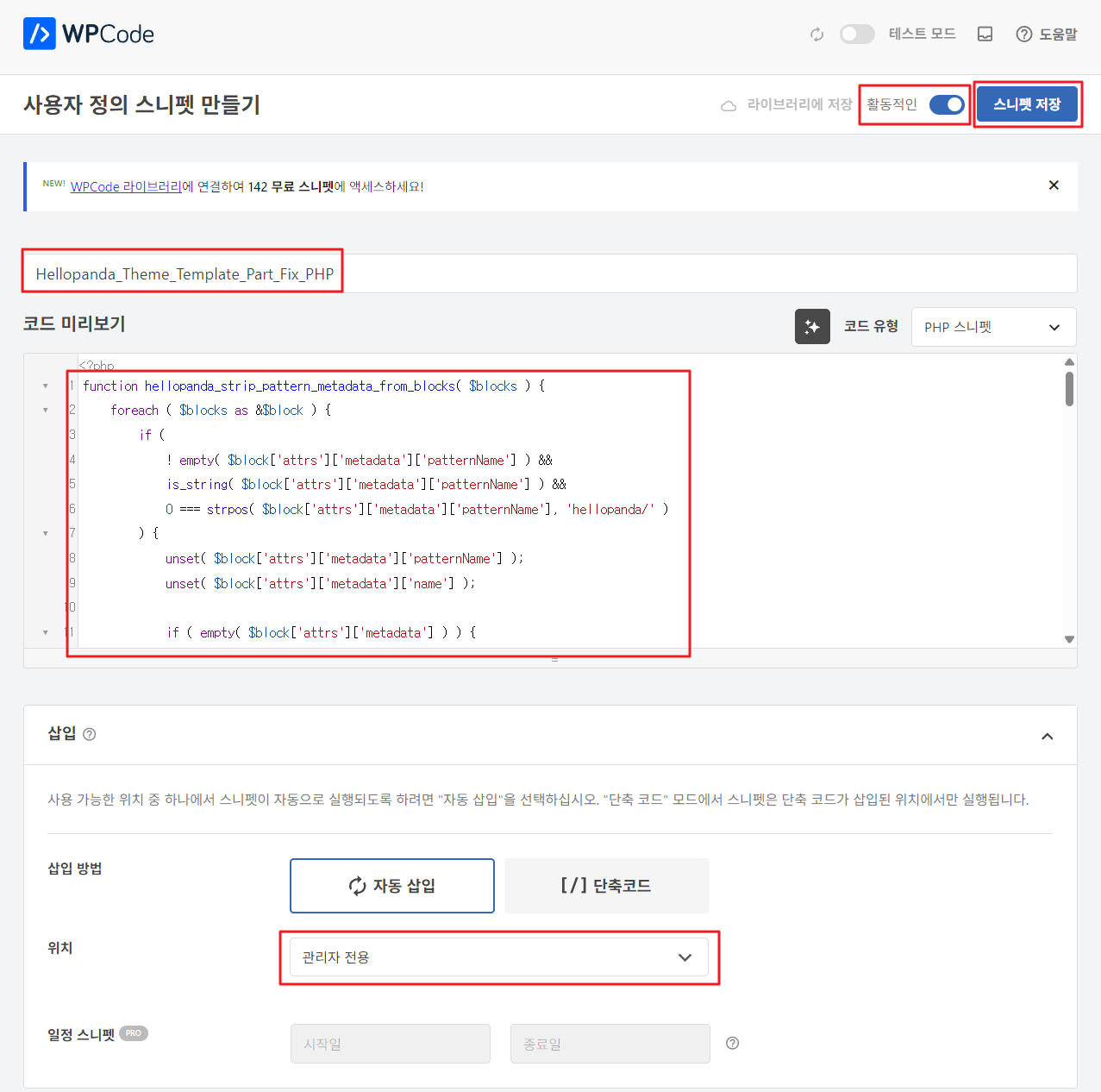
3. 만들기 화면에서 아래와 같이 설정 및 입력해주세요.
- ‘활동적인’으로 설정
- 제목은 원하는 값으로 입력
- 코드에는 아래 코드를 입력
- 위치는 관리자 전용으로 설정
↓↓↓
복사해서 사용할 코드보기
function hellopanda_strip_pattern_metadata_from_blocks( $blocks ) {
	foreach ( $blocks as &$block ) {
		if (
			! empty( $block['attrs']['metadata']['patternName'] ) &&
			is_string( $block['attrs']['metadata']['patternName'] ) &&
			0 === strpos( $block['attrs']['metadata']['patternName'], 'hellopanda/' )
		) {
			unset( $block['attrs']['metadata']['patternName'] );
			unset( $block['attrs']['metadata']['name'] );

			if ( empty( $block['attrs']['metadata'] ) ) {
				unset( $block['attrs']['metadata'] );
			}
		}

		if ( ! empty( $block['innerBlocks'] ) ) {
			$block['innerBlocks'] = hellopanda_strip_pattern_metadata_from_blocks( $block['innerBlocks'] );
		}
	}
	unset( $block );

	return $blocks;
}

function hellopanda_strip_pattern_metadata_from_content( $content ) {
	if ( ! is_string( $content ) || '' === $content || false === strpos( $content, '"patternName":"hellopanda/' ) ) {
		return $content;
	}

	$blocks = parse_blocks( $content );
	$blocks = hellopanda_strip_pattern_metadata_from_blocks( $blocks );

	return serialize_blocks( $blocks );
}

add_filter(
	'rest_request_after_callbacks',
	function ( $response, $handler, $request ) {
		if ( ! $response instanceof WP_REST_Response ) {
			return $response;
		}

		$route = $request->get_route();
		if ( false === strpos( $route, '/wp/v2/templates' ) && false === strpos( $route, '/wp/v2/template-parts' ) ) {
			return $response;
		}

		$data = $response->get_data();

		if ( isset( $data['content']['raw'] ) ) {
			$data['content']['raw'] = hellopanda_strip_pattern_metadata_from_content( $data['content']['raw'] );
			$response->set_data( $data );
		}

		return $response;
	},
	10,
	3
);

add_filter(
	'wp_insert_post_data',
	function ( $data, $postarr ) {
		if ( empty( $data['post_type'] ) || ! in_array( $data['post_type'], array( 'wp_template', 'wp_template_part' ), true ) ) {
			return $data;
		}

		if ( isset( $data['post_content'] ) ) {
			$data['post_content'] = hellopanda_strip_pattern_metadata_from_content( $data['post_content'] );
		}

		return $data;
	},
	10,
	2
);


add_filter(
	'block_editor_settings_all',
	function ( $settings, $context ) {
		$settings['disableContentOnlyForTemplateParts'] = true;

		return $settings;
	},
	10,
	2
);
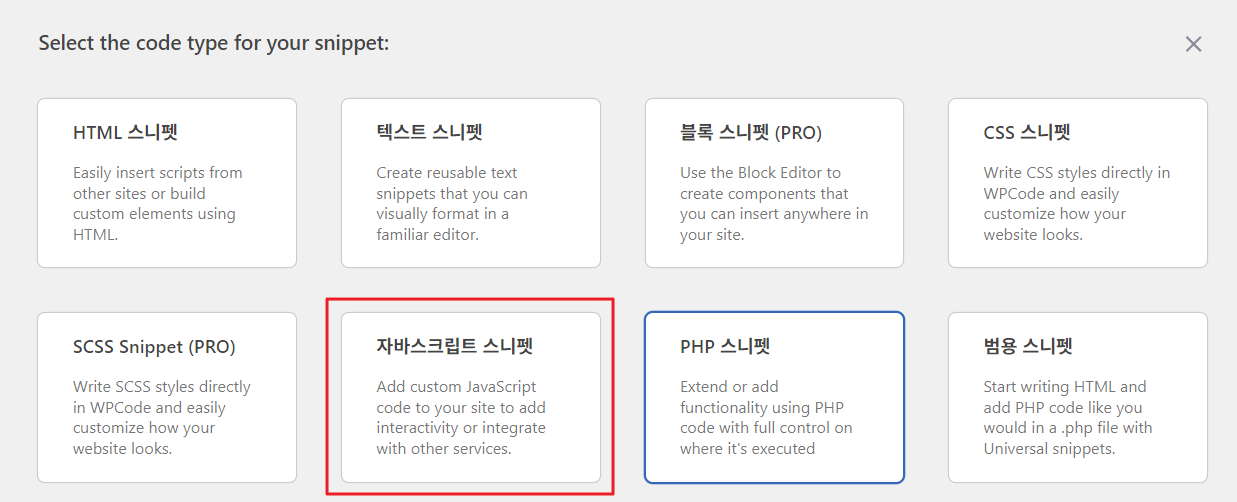
4. 코드 스니펫 메뉴에 접속하셔서 아래와 같이 자바스크립트 스니펫을 추가해주세요.
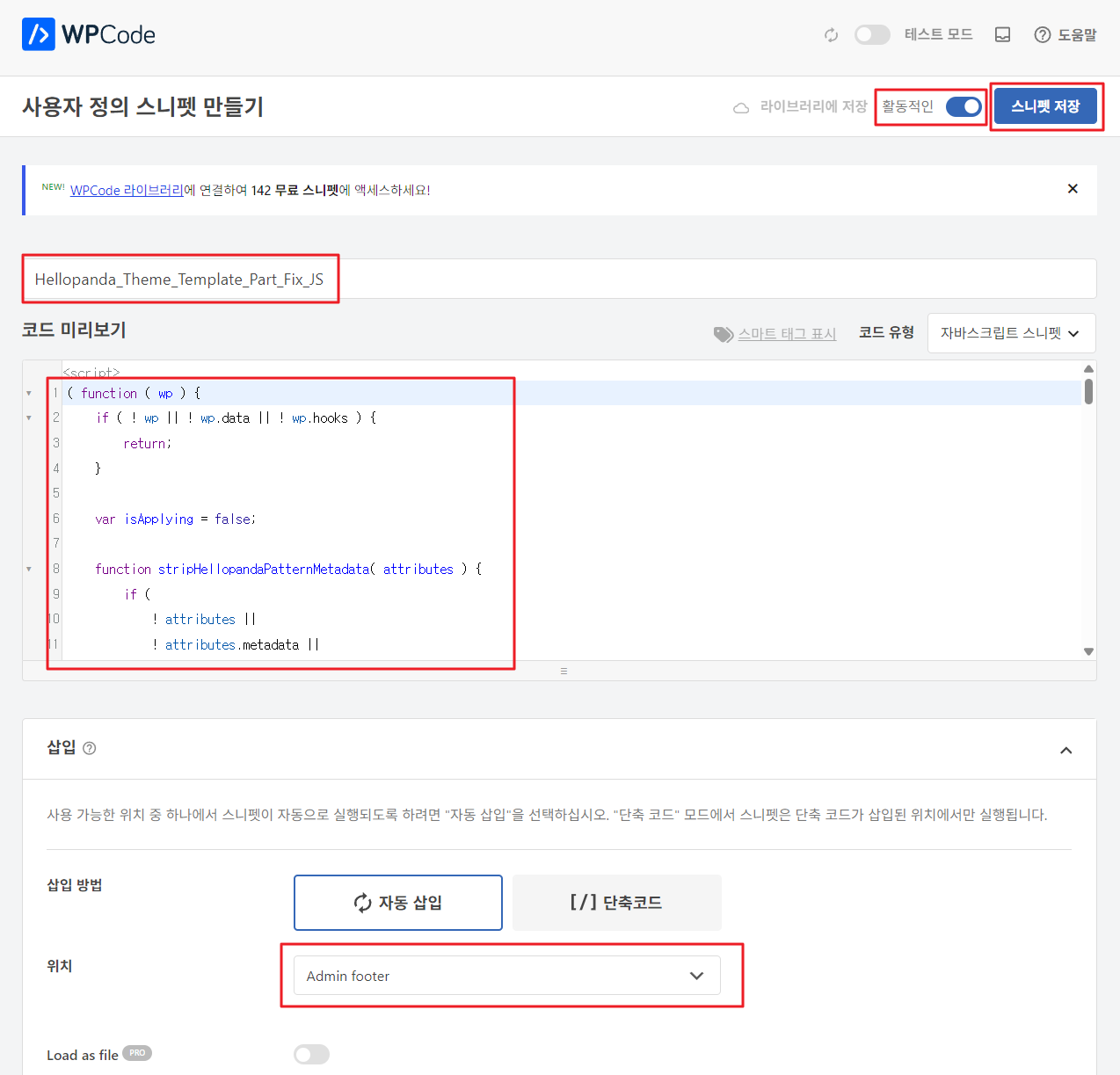
5. 만들기 화면에서 아래와 같이 설정 및 입력해주세요.
- ‘활동적인’으로 설정
- 제목은 원하는 값으로 입력
- 코드에는 아래 코드를 입력
- 위치는 Admin footer으로 설정
↓↓↓
복사해서 사용할 코드 보기
( function ( wp ) {
	if ( ! wp || ! wp.data || ! wp.hooks ) {
		return;
	}

	var isApplying = false;

	function stripHellopandaPatternMetadata( attributes ) {
		if (
			! attributes ||
			! attributes.metadata ||
			! attributes.metadata.patternName ||
			typeof attributes.metadata.patternName !== 'string' ||
			attributes.metadata.patternName.indexOf( 'hellopanda/' ) !== 0
		) {
			return null;
		}

		var metadata = Object.assign( {}, attributes.metadata );
		delete metadata.patternName;
		delete metadata.name;

		var nextAttributes = Object.assign( {}, attributes );

		if ( Object.keys( metadata ).length ) {
			nextAttributes.metadata = metadata;
		} else {
			nextAttributes.metadata = undefined;
		}

		return nextAttributes;
	}

	function collectBlockUpdates( blocks, updates ) {
		blocks.forEach( function ( block ) {
			var nextAttributes = stripHellopandaPatternMetadata( block.attributes );

			if ( nextAttributes ) {
				updates.push( {
					clientId: block.clientId,
					attributes: nextAttributes,
				} );
			}

			if ( block.innerBlocks && block.innerBlocks.length ) {
				collectBlockUpdates( block.innerBlocks, updates );
			}
		} );
	}

	function getBlocks() {
		var editor = wp.data.select( 'core/block-editor' );
		return editor && editor.getBlocks ? editor.getBlocks() : [];
	}

	function enforceTemplatePartSettings() {
		var editor = wp.data.select( 'core/block-editor' );
		var dispatcher = wp.data.dispatch( 'core/block-editor' );

		if ( ! editor || ! editor.getSettings || ! dispatcher || ! dispatcher.updateSettings ) {
			return;
		}

		var settings = editor.getSettings();

		if ( settings && settings.disableContentOnlyForTemplateParts ) {
			return;
		}

		dispatcher.updateSettings( {
			disableContentOnlyForTemplateParts: true,
		} );
	}

	function applyUpdates() {
		if ( isApplying ) {
			return;
		}

		enforceTemplatePartSettings();

		var updates = [];
		collectBlockUpdates( getBlocks(), updates );

		if ( ! updates.length ) {
			return;
		}

		var dispatcher = wp.data.dispatch( 'core/block-editor' );
		if ( ! dispatcher || ! dispatcher.updateBlockAttributes ) {
			return;
		}

		isApplying = true;
		try {
			updates.forEach( function ( update ) {
				if ( dispatcher.__unstableMarkNextChangeAsNotPersistent ) {
					dispatcher.__unstableMarkNextChangeAsNotPersistent();
				}

				dispatcher.updateBlockAttributes( update.clientId, update.attributes );
			} );
		} finally {
			isApplying = false;
		}
	}

	wp.domReady( function () {
		enforceTemplatePartSettings();
		applyUpdates();
		wp.data.subscribe( applyUpdates );
	} );

	wp.hooks.addFilter(
		'blocks.getBlockAttributes',
		'hellopanda/strip-pattern-metadata',
		function ( attributes ) {
			return stripHellopandaPatternMetadata( attributes ) || attributes;
		}
	);
} )( window.wp );
※ 수정하신 이후에는 꼭 “캐시 삭제” 를 해주세요.
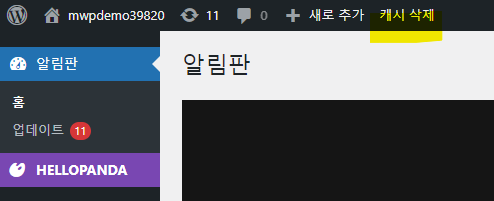
- 환경에 따라 “캐시삭제” 를 플러그인으로 설치한 분이 있을거예요. 카페24 회원이라면 이 플러그인은 기본적으로 설치되어 있습니다.